
I had to bear with paperwork at the beginning of this school year for about 3 weeks longer than I wanted to. It took a week or two for the laptops to get set up, and I didn't want to throw the kids into too much stuff all at once, especially since they were adjusting to the laptops, new classes, new teachers, and a new schedule. So I have held back on making my life easier - but this week I took the first steps with my middle school students by using
Google Docs for a few assignments.

Within
Google Docs is a little item called "
forms". It is a pretty easy way to just make a form (i.e. assignment). I embed my forms into my class wiki pages so the students can work on them there, but you can also easily
email them to students as well (all high school students and many middle school students have emails - get their addresses!).
All you need to make a
Google Doc is a Gmail address - if you have that you have a Google account. Just go to the menu up top and look for Documents. Once there, just click the "new" menu.
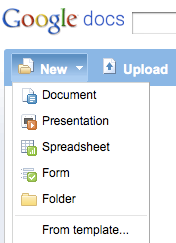
Choose "
form" from there and begin to create yours (I always make my first question "
Type your name here".) You can make fill in the blank, short answer, short essay response, and multiple choice forms quite easily. I can also pick a theme so the form isn't just a boring black and white screen.
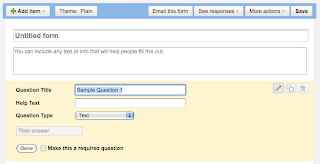
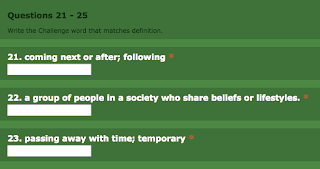
I made the first assignment one that would be easy on my students, since this is the first time using an online form for most of them. I made a pretty straightforward vocabulary assignment and embedded it into the wikis for my
6th, 7th, and 8th grade English classes.
Today I introduced them to their new word lists like always, and then I took them to the assignments page and walked them through the basics of this form. I was very happy that unlike the paper/pencil assignments, they seemed pretty engaged in this - they were more focused on using their other tools like
Visuwords to match up and try out their new vocabulary, and getting the correct responses typed into the form. Again - this was a pretty simple, straightforward type of assignment - but after using Google Docs daily, it won't be long before these kids are comfortable with anything!
Here is the best part for me - instead of a stack of notebook papers or worksheets wrinkled up, torn, and covered with scribbles and sometimes indecipherable middle school writing, and often put into the wrong inbox, I just get to see this lovely spreadsheet:
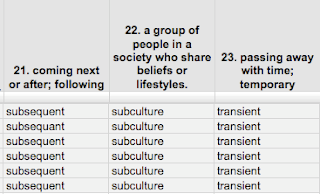
Isn't that a thing of beauty? Sure there are misspelled words - but I can read them! I can also compare them to others in the class and at a glance be able to see problems that students seemed to struggle with. Tomorrow in class, I will focus on those particular items, and not waste time on others that the students seem comfortable with.
The second a student hits the
submit button at the bottom of the form, I get it in a spreadsheet with a timestamp! Isn't that cool? As I sit here at home tonight I can tab over to my Google Docs and see who has finished their homework tonight and how they've done on it!
Google Docs and forms makes formative assessment quick, simple, and pretty accurate. I know how to adjust and differentiate my instruction immediately from the feedback!


