
How many blogs, online newspapers or magazines, or other online publications do you follow? How many would you LIKE to follow, if it didn't take much time and was easy to do?
I read (scan is more like it) around 30 educational and edtech blogs, about 5 educational news publications, and 5 regular online news publications. I don't read the whole things, and I don't always check them every day. They are all so good I hate to think I might miss anything in them, so I subscribe to their RSS feeds to make sure I can scan quickly to see if there is anything pressing I really need to read.
IF, at this point, you are saying "What is an RSS feed?" welcome to this discussion which will show you how easy this is. If you are saying, "I have RSS feeds", then please check back in tomorrow and maybe I'll have something new for you!
RSS stands for Real Simple Syndication. Knowing what it stands for doesn't help our understanding, so just forget that and remember "RSS". If you are reading any online publication that you enjoy, and in your browser bar you see this symbol;

then you can easily subscribe to that publication. Subscribing to their RSS feed simply means you can check their headlines whenever you want. They won't email you (you don't even give an email, a name, or sign in or up or anything), you don't pay, you won't get junk mail, and it takes about 5 seconds to subscribe.
I'll explain how I do this, because for me this is the easiest way to keep my publications in sight so that I remember to check my feeds.
First - I set up a folder right in my bookmarks toolbar (in Firefox) - just go to "bookmarks" and create a new folder right in the bookmarks toolbar menu - you can put it anywhere, but for me, keeping it in my bookmarks toolbar means it's right in front of my face. For starters, just name it "RSS Feeds". Later you may want to make several folders, depending on your reading habits - one for regular news, one for educational news, one for blogs, etc. The possibilities are probably endless.
Anyhow, lets start out with something simple -
Education Week is a good publication that covers a lot of topics that are current in education. When you go to their site, you will notice that their browser window looks like this;

That little blue box at the end is their RSS feed button. This is the very most simple way to subscribe to a feed. Simply click that button. You will immediately get a little pop-up menu with a couple of items - usually they say "Subscribe to RSS", and "Add RSS as a live bookmark in Delicious". We learned a little about
Delicious yesterday, but today we are just talking about very simple RSS - so as long as you are going to be storing it in that folder you made in your bookmarks toolbar, just click the option that says "Subscribe to RSS" (sometimes it will say "Subscribe to RSS 2.0"- also a good choice).
So, as soon as you choose the "Subscribe to RSS" option, a new page will immediately load, and at the top you will see this;
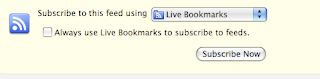
The folder you have created in your bookmarks toolbar is a "live bookmark", so you don't need to change this option. Just click the "Subscribe now" button. As soon as you do, this little window will pop up;
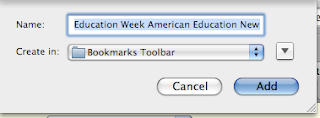
The blue highlighted portion is the title of the publication - it is highlighted because if you want to change it to a shortened form that is easier for you, this is where you can - you can also change it later in your bookmarks folder when you organize them. Underneath the name, is the part where you select your folder where you are putting this feed - in this case it will be the new folder you created in your bookmarks toolbar - so click that folder, then click the blue "add" button.
That's it! Now, when you click on that folder you created in your bookmarks tool bar called "RSS Feeds" or whatever you named it, you will see Education Week - when you roll your cursor over it, a list of the latest headline "feeds" will pop up with the latest at the top. You can now quickly peruse the headlines and click on the one that interests you - it will immediately take you to that specific article or post. How much easier could this be? You can put a lot of RSS subscriptions in your folder - I have 30 in my "EdBlogs RSS" folder alone and have room for more!
With my RSS feeds organized this way, I can very quickly scroll through all of the headlines of my favorite publications and pick and choose what I want to read (usually based on how much time I have available).
If you are new to this, here are some good "starter" feeds for your educational reading pleasure!
Edutopia,
Alaska Education, and of course a very good blog I know of called
EdTechSec (by now you may have noticed that little blue RSS button in the browser bar!).


